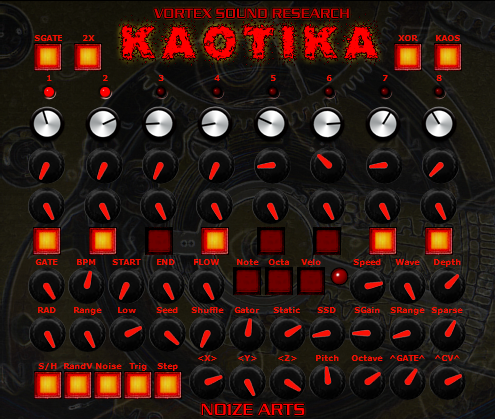
Kaotika is my new Generative Sequencer based on using Random Number Generator, Static Generator, & WhiteNoise for creating compositions. Kaotika is an evolution of KMF core adding 8 step sequencer engine hacked from my old projects. Kaotika is creative midi composition tool for driving hardware/software for producing Eerie, Macabre, Phantasmagoric, Horror/Scifi style soundtrack scores. Kaotika also is fully capable of producing EXTREME NOISE notations.
Posted inUncategorized|Comments Off on N01ZE ARTS KAOTIKA
Virtual loopback MIDI cable for Windows XP up to Windows 10, 32 and 64 bit.
This software can be used to create virtual loopback MIDI-ports to interconnect applications on Windows that want to open hardware-MIDI-ports for communication.
The ports created are unique for each user and only exist while the loopMIDI-application is running. So if you log-off, the created ports cease to exist.
When you close the configuration, the application will not terminate, but rather be minimized to the traybar. When you right-click on the traybar-icon of loopMIDI, you get an options-menu to either deactivate the application, configure the ports or to activate autostart each time you log on to the computer.
This software uses the virtualMIDI driver to actually create the ports.
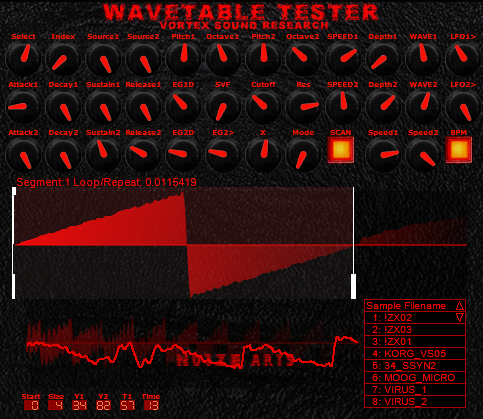
WaveTableTester gives the exact numerical math for “Single Cycle” loops. It also tests and plays wavetables in basic mono synth engine. WTT uses 8 loaded wavetables for using single cycles as synth voices. WTT synth engine features Multimode SVF 3 LFOs(LFO has ability for modulating wavetable index partials) 2 EG with modulation routings. WTT is my test tool for complex wavetable oscillators. WaveTableTester=super fast/simple/easy way for me testing sample data created in AudioTerm.
Custom Wav Samples made in Audio-Term using original Prophets VS & PPG WAVE data:
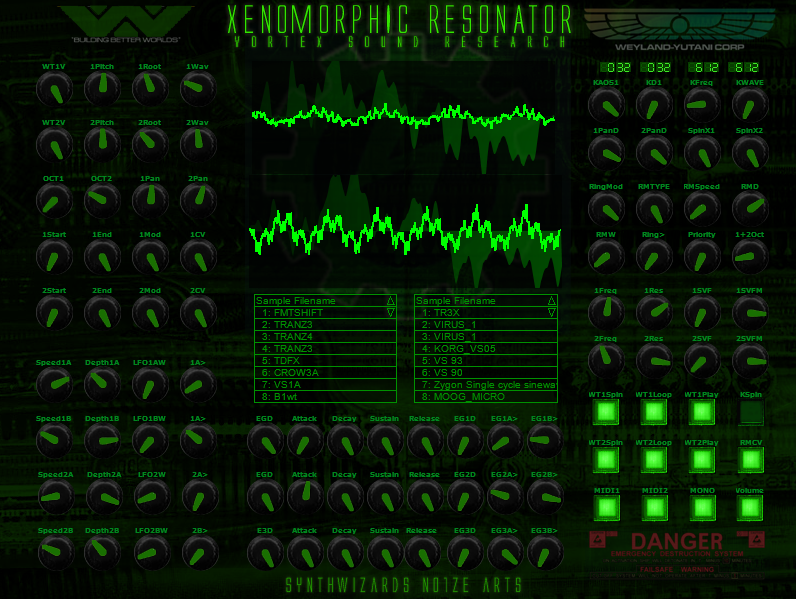
XenoMorphic Resonator VST features 2x complex morphing oscillators each using custom banks of 32 Wavetables/Transwaves/Samples created in AudioTerm. Extreme modulation capabilities from 8 LFOs 2 Envelope Generators, Randomizer Sample Hold, plus 24 types of Ring Modulation. XMR Scans Wavetables with BPM sync LFOs. This Sound Design Tool also “spins” through selecting sounds or utilizes “Kaos” function for selecting random sounds using BPM sync. “XMR” also features dual SVF Multimode Filters that self resonate. My original concept was merely creating something that would play back wave files created in AudioTerm yet the vicious “Alien” emerged for orchestrating sinister SCIFI/Horror sounds. Time for making up some new custom banks for XMR in AudioTerm!
Revised Version now with rebuilt Index Modulation Wavetable Engines!
Posted inUncategorized|Comments Off on SynthWizards XenoMorphicResonator VST
“I programmed a small windows based tool called “Komplex – Term” which can read and write WT files for the Terratec Komplexer. Further you can render it’s wavetables to wave format, so you can use it in your Wusikstation, VAZ Modular, Reaktor… . It also offers wave file resynthesis and some editing functions like reordering slices, drawing spectra, a free formant filter (similar to the kawai k5000)and so on. I wrote a short manual, but please excuse my poor english.” Mathias Gurk
Here’s an explanation about the concept
(especially about the “KTERM/AUDIOTERM wavetable generator”)
Written by Mathias Gurk
AT was intentionally made for my personal use and “just for fun” to learn how to code in C – my version of “Hello world”.
There never had been ‘seroius’ plans for making it public when I started this project. Maybe this explains why it’s so ‘strange’. Due to very limited time and some health issues I used all of my energy for the program itself and not for writing a manual.
AT consists of different sections, KTERM<> is the one for creating “classic” wavetables for Dune2, serum, Komplexer and some other products.
KTERM<> is an additive synth: 33 slots with 64 bipolar sine partials each. It’s an emulation of the Terratec Komplexer wavetable osc, all other formats are derived from that model.
I chose this model because it has the right ratio of data amount and quality. Further many products beside Komplexer can use the results (converting wavetables which make full use of proprietary features of a certain product is much more difficult than converting normal audio data for different samplers).
AT has an automated file recognition and sorting system. It can distinguish a Komplexer *.WT file from a Dune2 *.WT file or from a Surge *.WT file… . Different file types are stored in different directories to keep track of which *.WT file belongs to a certain synth. Damaged and/or unknown formats are moved to a special ‘recycle bin’ folder (button RECBIN<> in the start page, here you get also information about the error).
Further the sound data folders can be individually moved to an abritrary location (because some synths require their files stored to a developer-defined location). This moving can be done using UTILITY<> and then selcting the PATHS<> page.
Regarding the proprietary wavetable formats (Surge, WaveGenerator, Dune2, EPS/ASR, Blofeld): AT can only load it’s own files. This is a required limitation, because the formats are VERY different (in data type, size, content, number of slots). All of these formats hold special synthesis data for reloading and instant playback in the browser pages. In some cases this additional dataset is encoded in the wavetable data itself (Blofeld, Komplexer). In other cases it’s appended. Editing these files outside Audio-Term will destroy these data, so don’t try that if you want to reload them later in AT.
Regarding the GUI: The lower button row holds the main pages and the playback buttons. The upper row holds the functions of a page and further sub pages / input options ( in that case the button name has an <> appendix)
The KTERM main pages:
SYSTEM<>
Here you can access the playback volume and playback speed of a wavetable. you also can empty all loaded data in RAM using FLUSH.
DISK<>
Depending on the file type you have different options. For all files you can switch the pages, search for a file name (FIND<>), rename and delete a file. You further can switch between the directories of the different file types using F_TYPE<> and call the windows explorer to get direct and full access to the current directory.
Further options depend on the file type. Wavetable files can be loaded directly, samples have to be analysed first. Single cycle waves are loaded from the assembling page ASSEM<> (see below).
VIEW<>
Here you can have a look on the ram data in different modes (waveform and spectral data). Some eye candy…
SLICE<>
This is the slice editor. You have access to the 64 bipolar partials (log scaling). WDRAW<> is a sub menu to draw the content as wave. The drawing then is analyzed and resynthesized. TOOLS<> hold some makro options for the partials (like normalizing or inverting). You should try the buttons and see what happens – the app won’t get broken.
If you don’t like the result you see/hear, press UNDO – it keeps track of the last 512 changes of the partial data.
ASSEM<>
Here the single cycles and wavetables in the different directories are used as ‘library’ to assemble new wavetables. Select source and destination slice with the SRC and DST buttons and transfer the data with SRC>DST.
ENV<>
On this page you also have access to the partials (bipolar, log scale), this time not 64 of a slice but a single partial over 33 slices of a wavetable. This is the envelope of a partial. The selected one has a fat line, all others are represented by thin lines. Very similar to the harmonic envelopes of the Fairlight CMI. On complex sounds this can look annoying. In this circumstance you can use VIEW to focus on the selcted envelope.
TEF<>
This is a special page which holds a lot of sub functions regarding
– polarity of the partials (PLOAR<>),
– amplitude scaling (SCALE<>),
– slice reordering (ORDER<>),
– a filter (FILTER<> – basically an additional “filter” slice with 64 partials, an envelope for shifting and access to the ‘library’ on disk to import spectral data)
– a formant shifter (SHIFT<>),
– a generator for filling the table with symmetry-modulated waves (SYMOD<>),
– and the interpolation function (IPOL<>).
The latter is very flexible – the goal is alwas to create a fully filled table from waves on arbitrary positions – even from a single wave. There are two interpolation algorithms: IPOL simply fills empty slices. STRETCH+IPOL fills the table by scaling the time base, which can be important especially for analyzed samples.
Two further additions:
OPTIMIZE button:
KTERM has an internal resolution of +-127 steps, but the dynamic of a 64 partial additive engine is much larger. Too large to use it without artificial limiting, a saw would be 50 times the amplitude if a single sine. OPTIMIZE adapts the partials to the limited waveform amplitude. In most cases this can be done automatically, but sometimes manual correction is required to get the best results out of the limted dynamic range.
POL_LOCK button:
KTERM uses bipolar sine waves, which improves the quality especially on sample resynthesis (otherwise everything would have a ‘sawtooth touch’). POL_LOCK tracks each of the 64 envelopes and corrects polarity jumps. In most cases this is usefull as it makes the spectral evolution over time more stable, but it changes the sound slightly. So whenever this button appears, you should try if it sounds better with or without POL_LOCK.
Okay, this short explanation isn’t a manual by far, but it explains some of my thoughts when I coded Audio-Term. I hope it was understandable a bit – I’m not a native speaker and also no sound engineer.
“Transwave – Term” (became Audio Term)
you can see how ENSONIQ hardware does “Transwaves”
Audio Term was originally “Transwave” Editor for ENSONIQ .efe format
December 22, 2017 Hi everyone. Today I have very bad news. I have not heard from Mathias since August this year. He does not answer on Facebook or on mail. His Facebook friends have not heard from him for a long time. I know that he has health problems. I do not want to say more about that. Since he is the programmer, I can not give competent answers to technical questions. I only operate this site. OK. I’ll keep you up to date.
Here again the link to the download for Audioterm. There are always questions about updates. Mathias, the programmer of Audioterm, will not continue to develop the program. It is as it is. I think we can be happy and grateful that the program works so well with Windows 10.
WaveEdit: a cross-platform, open source waveform editor for the Synthesis Technology E352 Cloud Terrarium and the E370 Quad VCO
WaveEdit is a free tool on PC/Mac/Linux that allows powerful creation and editing of wavetables for the E352 and E370 VCOs. Using standard WAV formats, the editor includes a full toolbox of shortcuts. An audio Preview is available to audition the waves before loading into the module.
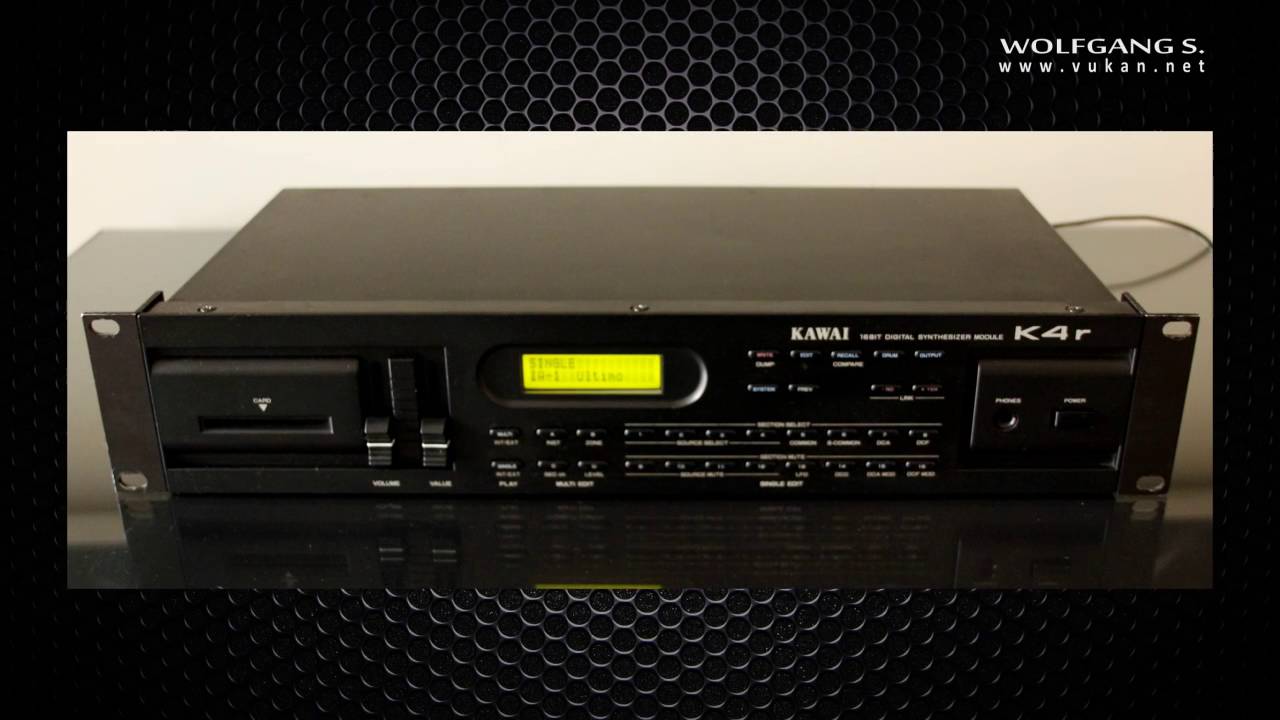
This revolutionary new synthesizer uses 16-bit sampled and synthesized waveforms for optimum sound quality. The friendly user-interface and parameter structure of the Kawai K series has been retained, and new functions and features added to increase the K4r is music making power.
The K4 is a 61 key touch-sensitive synthesizer equipped with a DMS (Digital Multi Spectrum) tone generator capable of up to 16 notes of polyphony when set at two Sources per tone. The K4r is a 19 inch, 2U rack-mount module version.
256 high quality internal waveforms
The K4/K4r has 96 CD (Digital Cyclic) waveforms composed of as many as 128 harmonics, and a total of 160 PCM waveforms, for a total of 256 waveforms. Because the K4/K4r’s internal waveforms are reproduced using 16-bit quantization, noise and distortion are virtually inaudible.
DRUM Section
The K4/K4r has its own DRUM Section which can be controlled independently of SINGLE Patches or the eight Sections of a MULTI Patch. The 61 keys from C1-C6 on the keyboard may be assigned freely to produce these tones.
Internal EFFECT (K4) and mising capability (K4r)
The K4 has 16 types of internal effects, including Reverb, Delay and Overdrive, etc.. In MULTI PLAY, the depth of the effect may be set for each tone.
Realistic touch response
The K4/K4r has the feeling of an acousic piano keyboard, a feature which has made the Kawai K series so popular. In addition, Velocity, Aftertouch, Release Velocity and Keyboard Scaling features allow the expression of the most minute touch on the keyboard.
MULTI PLAY capability
Eight SINGLE tones may be reproduced by the DMS tone generator, freely combining the Layer, Velocity Switch and Split functions, enabling far more beautiful layered and split sounds than have ever been possible before.
Variable Multi-Timbral capability
In the MULTI PLAY mode, each tone may be set to a specific MIDI channel, allowing the K4/K4r to function as though it were eight MIDI tone generators (or nine with the DRUM Section). The Variable Multi-Timbral function also allows the voices of each Section to be played simultaneously.
INDIVIDUAL OUTPUT function (K4r only)
The K4r is equipped not only with two stereo output jacks, but with six separate output jacks as well to allow the connection of external effects units to create high quality sound.
LINK
Eight patches from those in the unit may be selected and stored together. This function is used, for instance, when multiple tones are to be used in sequence. When arranged in the order in which they are to be called up, the operator may easily change tones from one to the next while playing.
MIDI
By connecting an external MIDI device to the MIDI jack, the K4/K4r may be used as a tone generator module with drums, or to control the external MIDI device.
Card
A card permits an increased number of tones to be placed in memory. One card can hold 64 SINGLE Patches, 64 MULTI Patches, the DRUM Section and EFFECT or OUTPUT Settings.
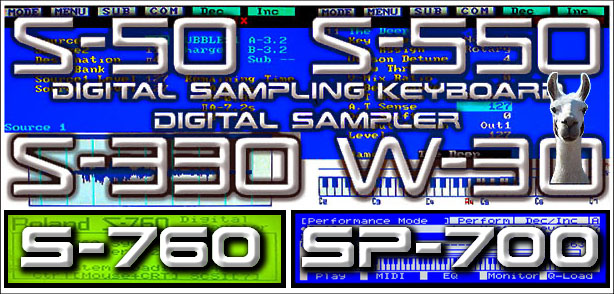
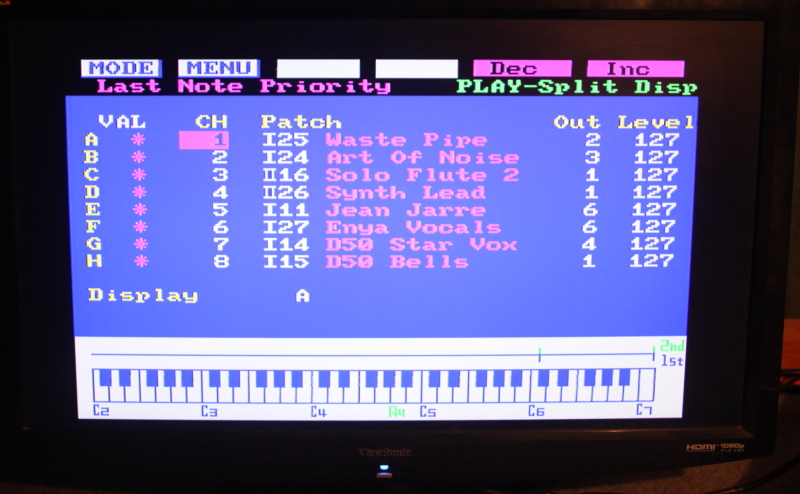
A great resource for new and seasoned S‑50 / S‑550 / S‑330 / W‑30 sampler owners. A lot of interesting information is here along with DIY’s, Start-Up Disks and Free Sample Disks. In the late 1980’s, the S‑50 and S‑550 were two of the hottest samplers on the market because of great sounds, free sample libraries and the ability to connect a color monitor and a mouse for easy menu navigation. These samplers can be found for incredibly low prices on eBay and elsewhere. I purchased a near mint W‑30 for only $35. It’s now an indispensable keyboard in my studio and a real workhorse. Granted… this is old technology by today’s standards, but still… great sounding instruments!
Year Of Release: 1987 Retail Price: $3,495 USD
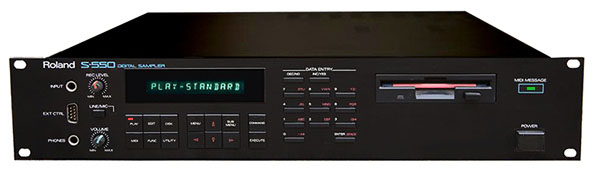
Roland S-550
A rack-mounted version of the S-50 came in the form of the S-550, which also had double the sample memory (1.5 Mb) and more importantly, real-time filters (called time-variant filters) derived from LAS-type synthesizers like the D-50. A slimmed down, consumer friendly version of the S-550 was also available as the S-330. Both rack-mounts support the DT-100 Digitizer Tablet and an external CRT monitor. The S-50/S-550 has been used by Vangelis, Duran Duran and Jimi Tenor.
Eye found the old Nubus card and breakoutbox for rebuilding Radius VideoVision Broadcast System
not that need it for video anymore yet figure may as well use the extra audio/video i/o with 442 system
have all the drivers and software on active working SCSI hard drives
Set the Wayback machine for the mid 1990’s and read this! Radius VideoVision Telecast SP ™ Nubus running Radius Edit™ oN a Apple 7100/80 with a FWB SCSI Jackhammer™, Blue ICE™ and Sonnet Crescendo™ CPU accelerator cards.
Within the Radius Telecast setup, you would be able to edit your video projects right on the desktop with professional results! Gone were the days of trying to cut your film with white, cotton Mickey Mouse gloves on a Steenbeck® flatbed editor and splicing it together with Scotch or splicing tape or, paying exuberant cost for your negative and answer print of you’re film!
A VideoVision Telecast was a professional video editing, production station in a box as long as you already had an Apple 7100/80 (later the Apple 9600/350 series machine with PCI-Bus architecture) or, Radius 81/110 (Mac clone) with plenty of RAM, an FWB Jackhammer SCSI card and a couple of StudioArrays for storage. The software included with the Telecast was Adobe Premiere, Adobe After Effects (Adobe just acquired AE from CoSA at the time), VideoFusion and my favorite editing tool of choice even over Media Composer, Radius Edit! You would then just connect a Sony Betcam SP or S-Video deck to the dedicated computer and you’re off to spin some serious video sorcery!
Reflecting on this, I remember that I was one of the more popular filmmakers on my block simply because I owned (I now own two) a Radius VideoVison SP Telecast ™ system. Everybody that came to me was some sort of budding filmmaker, crawling out of the woodwork, just itching to get their movie projects on to and edited on this thing, the fact that you could now edit your film right on the desktop in a stable work environment got me chopping at the bit to be a filmmaker!
Yes, Avid® did get to the market first, in the mid eighties within the desktop environment. Fully integrating their 1000XL, Media Composer® system with an Apple Macintosh® computer but, who could afford the astronomical price tag $70,000.00? Funny that’s the same price that the Red One Dragon™ camera would cost you these days with all the accessories and a decent set of glass!
I don’t think I mentioned that I run my Radius on OS 9, oh yeah! Also, I have the latest and last seed package ever to roll out of Digital Origin for the Telecast before the company went belly-up. If you by chance are still running a Radius VideoVision Telecast™ on a Nubus or PCI based system and need some support to get it up and running on OS 9, I can shoot you my extensions and control panels list as well as my working setup. Also, I have Nubus and PCI drivers for Radius, FWB JackHammer™, SledgeHammer™ products as well.
If you’ve ever been to Fantasy Studios in Berkeley, California then, you can fully appreciate this. In the bowels of Fantasy there are many ancient Apple computer systems that run older OS’s and software primarily used for reading older audio, sound and movie files.
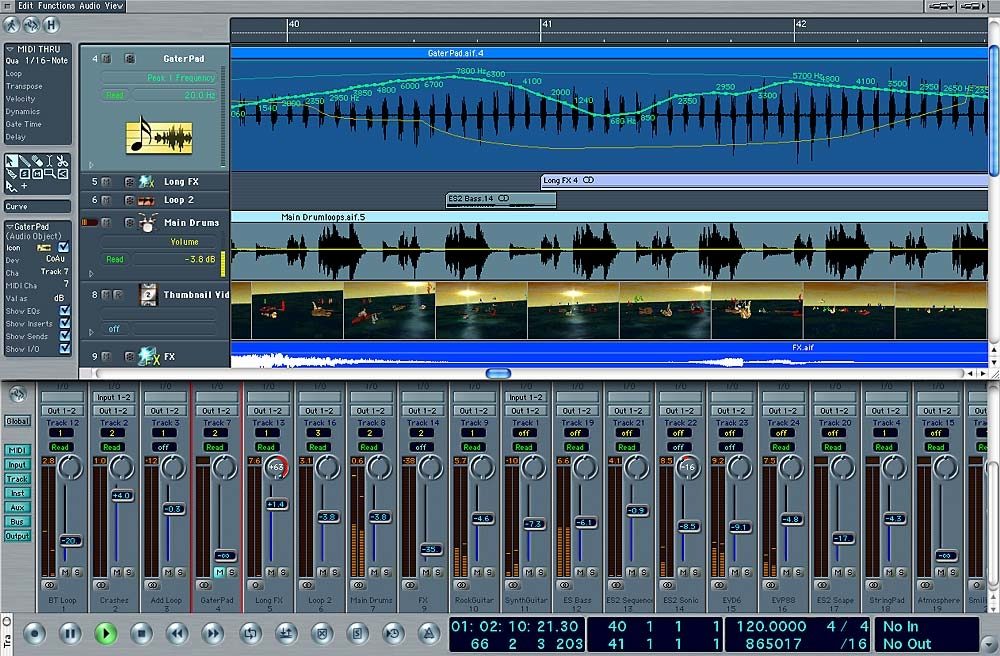
Logic is het notatie- en sequensprogramma wat we op school gebruiken. Onderstaande handleiding kun je downloaden of online raadplegen. Je hebt er Adobe Acrobat reader voor nodig, of een plug-in in je browser die pdf-jes kan openen. Internet Explorer heeft deze plug-in standaard ingebouwd.



 Mathias Gurk










 23 /
23 /  2014-04-14 /
  6d1e544c69019e7ae4b9612c2d6f64cca91cd348
 2018-04-24 /